Your life data, from the terminal.
A single binary that gives you a full TUI time tracker and an MCP server that lets AI assistants query 10+ years of your life data.
$ rows tui
Launching TUI time tracker...

$ rows mcp install --demo
✓ MCP server configured for Claude Code
The MCP server will be available in your next Claude Code session.
One binary. Three platforms.
No dependencies, no runtime, no installer. Just download and run.
macOS
Apple Silicon Downloadcurl -fsSL https://rows.life/download/rows-macos-arm64 -o rows && chmod +x rows
Auto-updates built in — run rows upgrade to get the latest version.
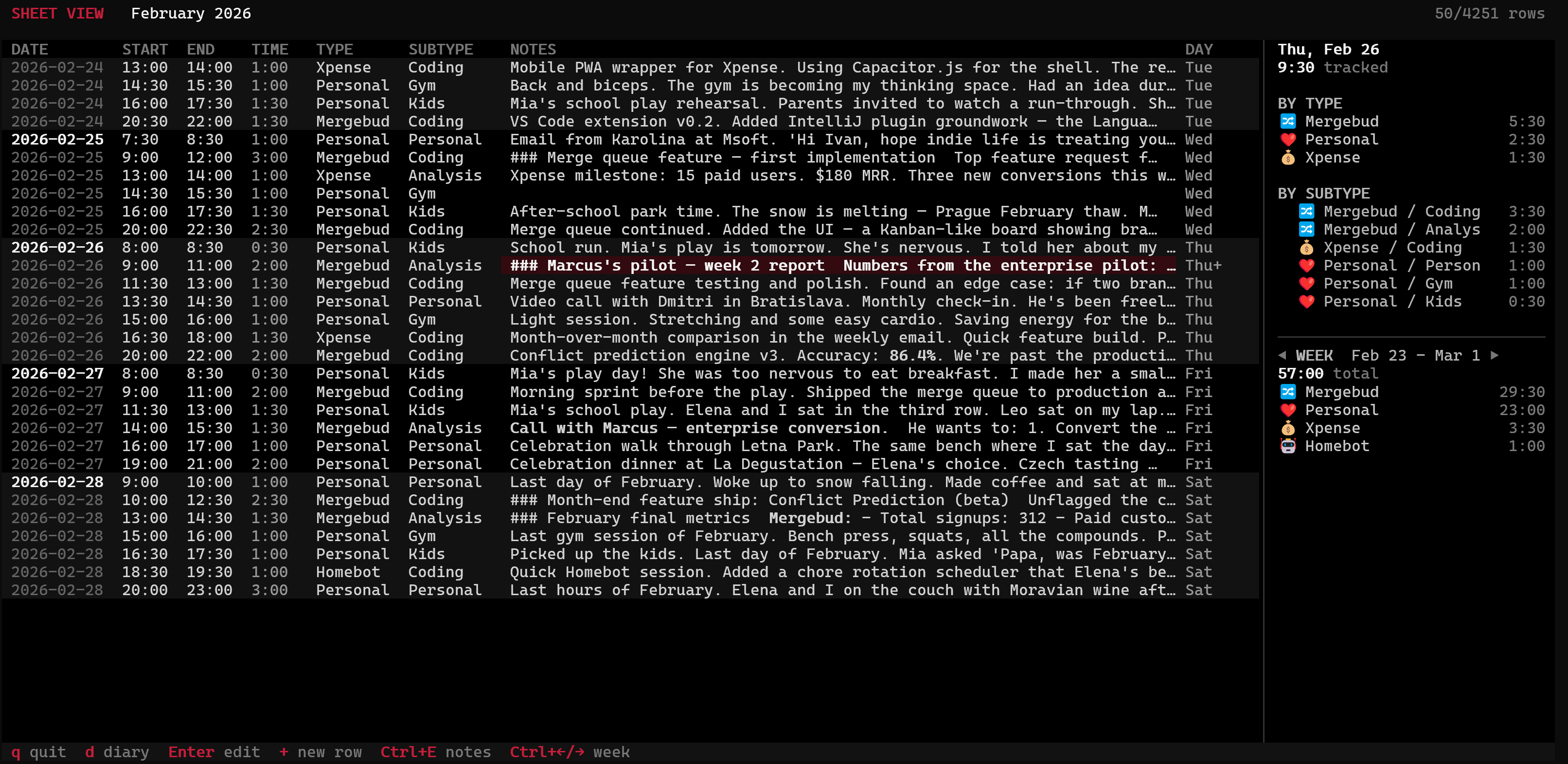
A full time tracker in your terminal.
Navigate your entries with keyboard shortcuts. Add, edit, and browse your time log without leaving the terminal. Perfect for developers who live in the command line.
Ask Claude about your life.
The rows binary includes a built-in
Model Context Protocol server.
Install it in Claude Code, and Claude can query your entire time-tracking history —
semantic search, date ranges, categories, statistics.
$ rows mcp install
✓ MCP server configured for Claude Code
Available in your next Claude Code session.

# Or try with sample data — no need to enter your own:
$ rows mcp install --demo
rows mcp install --demo to see how it works
with sample data. No need to enter your own data first — just install and start asking questions in Claude Code.
rows binary, run
rows mcp install --demo, and try every single one of them yourself in Claude Code.
What you can ask
"Show me that last 3 rows"
● Here are the last 3 entries, all from February 28, 2026:

  Time   Category              Hours  Note
  ─────  ────────────────────  ─────  ──────────────────────────────────────────────────────
  20:00  Personal > Personal   3.0h   End-of-February reflection with Elena — reviewing
                                      income to old Msoft salary, setting March goals

  18:30  Homebot > Coding      1.0h   Added chore rotation scheduler to Homebot — Elena
                                      immediately assigned bathroom cleaning

  16:30  Personal > Kids       1.0h   Picked up kids, got ice cream in February in Prague,
                                      Mia asked if it was a good month
"List the main projects I worked on since Sept 2025"
● Here are the main projects since September 2025:

  Project     Hours  Entries
  ──────────  ─────  ───────
  Msoft        651h      474
  Personal     411h      406
  Mergebud     267h      153
  Xpense        67h       50
  Homebot        5h        4

  Key takeaways:
  - Msoft was the biggest time investment (~651h) — likely your main job
  - Mergebud got serious attention (~267h) — looks like a major side project
  - Xpense got ~67h of work
  - Personal (411h) covers kids, gym, biking, and personal time
"When did I quit Msoft?"
● Your last day at Msoft was January 29, 2026. That's when you returned
  equipment, said your goodbyes, and Havel walked you to the building exit
  for the last time.

      2026-01-29 15:00 | Msoft > Meeting | 1.0h | ### The Final Goodbye
"How much time did I spend at the gym this year?"
● Now I have all the data. Here's the summary:

  Month     Sessions  Hours  Avg/session
  ────────  ────────  ─────  ───────────
  Jan 2025        12  12.0h        1.0h
  Feb 2025        12  12.0h        1.0h
  Mar 2025        12  12.0h        1.0h
  Apr 2025         4   3.2h        0.8h
  May 2025        10  10.0h        1.0h
  Jun 2025        10  10.0h        1.0h
  Jul 2025         8   8.0h        1.0h
  Aug 2025         8   3.5h        0.4h
  Sep 2025        13   5.2h        0.4h
  Oct 2025        16   6.4h        0.4h
  Nov 2025        10   8.0h        0.8h
  Dec 2025         8   6.2h        0.8h
  Jan 2026        12  13.0h       ~1.1h
  Feb 2026        19  19.0h        1.0h

  Notable patterns:
  - April 2025 was a low month — only 4 sessions (transition to biking season?)
  - Aug-Oct 2025 — sessions stayed frequent but got shorter (0.4h each)
  - Jan 2026 onward — sessions jumped back to 1h+ after quitting Msoft
  - Going indie clearly boosted gym time — the 3pm slot became the new routine
"Show me a bar chart of time spent per month on my most profitable side project"
● Mergebud started July 1, 2024. Here's your time investment per month: Month Hours ──────── ───── ────────────────────────────────────────── Jul 2024 42.0h Aug 2024 14.0h Sep 2024 11.0h Oct 2024 15.0h Nov 2024 18.0h Dec 2024 22.0h Jan 2025 16.0h Feb 2025 8.0h Mar 2025 10.0h Apr 2025 8.0h May 2025 12.0h Jun 2025 8.0h Jul 2025 6.0h Aug 2025 6.0h Sep 2025 8.0h Oct 2025 6.0h Nov 2025 10.0h Dec 2025 12.0h Jan 2026 28.0h Feb 2026 95.0h
"Show me all the times I went for dinner with my wife"
● Here are the dinner dates I found:

  Date       Restaurant          Dur   Occasion
  ─────────  ──────────────────  ────  ─────────────────────────────────────────
  Feb 14,    Aromi               3.0h  Elena's birthday + Valentine's Day.
  2024                                 Kids at her parents. She loved the earrings

  Jun 7,     Eska, Karlin        1.5h  Celebrating Elena finishing a cafe logo
  2024

  Aug 17,    Italian place,      1.6h  Date night. "Excellent pasta"
  2024       Vinohrady

  Feb 14,    Eska, Karlin        3.5h  Valentine's Day surprise. Tasting menu +
  2025                                 Czech wine pairing. Talked about going
                                       full-time on Mergebud

  May 30,    Cafe Savoy          1.5h  Date night. Planned the Lake Balaton
  2025                                 summer vacation

  Jul 14,    Lake restaurant     1.5h  Last night of the Balaton vacation.
  2025       (Hungary)                 Toasted with Olaszrizling wine

  Feb 14,    Lokal Dlouhááá      3.0h  Valentine's Day. Walked home through
  2026                                 Old Town, Charles Bridge lit up

  Feb 27,    La Degustation      2.0h  Celebrating the enterprise deal.
  2026                                 Elena's choice, Czech tasting menu
That's what happens when your time tracker becomes a life database.
The MCP server exposes tools to filter entries by date, category, or keyword, compute summaries grouped by project or time period, and run semantic searches across your encrypted notes — all decrypted locally on your machine.
Run the demo in 5 minutes.
You don't need to enter any data to see what the MCP server can do. Demo mode comes with sample data — thousands of time entries spanning years of work, side projects, gym sessions, dinners, and family time.
Dry run first
Run the MCP server directly to see it index the demo data. It will sync entries from the server, load the embedding model (downloads ~80 MB on first run), and compute semantic embeddings for every entry. This is what powers the natural-language search.
$ rows mcp --demo

  ── rows.life MCP ── demo mode ─────────────

  ✓ Authenticated
  ● Syncing entries...
    Server: 4,251 entries · Cache: 0
  ● Downloading 4,251 entries...
    ████████████████████████████░░ 3,500/4,251
    ...
  ✓ Synced 4,251 entries
  ✓ Embedding model loaded (multilingual-e5-small)
  ● Computing embeddings for 4,251 entries...
    ██████████████████████████████ 4,251/4,251

  ── Ready ──────────────────────────────────
Once you see Ready, press Ctrl+C to stop. The cache is saved locally — next time it starts in seconds.
Install in Claude Code
This registers the MCP server so Claude Code can find it.
By default it writes to .mcp.json in the current directory.
$ rows mcp install --demo
✓ MCP server configured for Claude Code
Available in your next Claude Code session.
Ask away
Open Claude Code and start asking questions. Try any of the examples above — they all work with the demo data. Ask about projects, gym time, dinner dates, or anything you can think of. Claude has access to the full history.
Clean up
When you're done exploring, remove the MCP server configuration with one command.
$ rows mcp uninstall
✓ MCP server removed
Your terminal. Your data. Your rules.
Download the CLI and start tracking — or try demo mode in 5 minutes.